
Call us: 1-800-927-5107 647-494-7800 ext. 1008

Automation and Efficiency: How CNC Routers Increase Production Output

Automation and Efficiency: How CNC Routers Increase Production Output

How CNC Routers Increase Production Output

Have you ever wished there were more hours in a day? Or perhaps you're considering your team and asking how to increase productivity without hiring new staff. A CNC router machine can help with that. It is more than just a tool for sign makers—it's a game changer.

Think about it: manually cutting out letters, especially complex ones, takes time and precision. One slip, and you're starting over. But with a CNC router machine, you load your design, hit "go," and the machine takes care of the rest. Talk about consistency!

How Does a CNC Router Machine Automate the Process?

First off, let's talk about the software. You design your letters in CAD/CAM software, and then the software generates the toolpaths. This tells the CNC router machine exactly where to cut. No more hand-drawn templates or manual measurements. This digital workflow alone saves loads of time.

  • Automatic Tool Changers: These are a huge time-saver. Imagine stopping and changing bits every time you need a different cut. With an automatic tool changer, the machine does it for you. This means you can run complex jobs with multiple tools without any downtime.
  • Vacuum Tables and Clamping Systems: These hold your materials securely in place. No more worrying about materials shifting during cutting. This not only increases accuracy but also speeds up the process, allowing you to run longer jobs without interruptions.
  • Software Integration: Modern CNC routers integrate seamlessly with design software. This means you can go from design to production with minimal steps. This streamlined workflow reduces the chance of errors and speeds up the entire process.

Why Does Efficiency Matter?

Okay, so we know CNC routers automate a lot of the process. But why does that matter? For starters, it frees up your team to focus on other tasks. Instead of spending hours cutting out letters, they can work on finishing, installation, or even customer service. This not only increases productivity but also improves job satisfaction.

< Older Post

Newer Post >

Acrylic Laser Cutter, cnc laser cutter manufacturers, Canada & USA

Channel Letters Made Easy with a 130W CO₂ Laser

October 15, 2025

Discover how an Acrylic Laser Cutter boosts production and why top CNC laser cutter manufacturers recommend these systems for shops across Canada & USA.

Automated CNC router increasing sign shop production output

Laser Equipment in the Sign Industry

By Designer Green Lotus • June 17, 2025

In the early days of industrial laser equipment, only large, well-established companies could afford it. However, in recent years, decreasing prices have made laser equipment accessible to medium-sized and even small companies. When it comes to laser equipment for the sign industry, we are experts!

CNC router cutting sign components with precision

Keep Your CNC Router Humming: The Ultimate Maintenance Guide

By Dov Rom • January 17, 2025

How can you keep your CNC router running smoothly with regular maintenance?

CNC laser cutter processing sheet material in a sign shop

Maintenance Tips for Keeping Your CNC Laser Cutter in Top Condition

By Dov Rom • September 23, 2024

CNC laser cutters are essential tools in the sign industry, and they are known for their precision and versatility. Regular maintenance is crucial to ensure these sophisticated machines deliver high-quality results and remain reliable. Proper upkeep extends the lifespan of your CNC laser cutter and enhances its performance and efficiency. From routine cleaning and inspections to mechanical maintenance and software updates, each aspect of care contributes to the smooth operation of your equipment. This blog will explore essential maintenance tips for keeping your CNC laser cutter in top condition. By following these guidelines, you can prevent common issues, reduce downtime, and ensure that your CNC machines for the sign industry consistently meet your high standards. Discover how to keep your equipment running at its best and avoid unexpected disruptions in your production process. 1. Regular Cleaning for Optimal Performance Regular cleaning is essential to ensure your CNC laser cutter operates smoothly. Dust and debris can accumulate in various parts of the machine, affecting its performance and accuracy. Clean the lenses and mirrors frequently to avoid buildup obstructing the laser beam. Use a soft, lint-free cloth and appropriate cleaning solutions to avoid damaging sensitive components. The air filters should also be checked, cleaned, or replaced to prevent contamination from affecting the machine's efficiency. By maintaining a clean environment, you can enhance the longevity and precision of your CNC laser cutter. 2. Routine Inspections and Calibration Routine inspections are vital to identifying potential issues before they become significant problems. Regularly check the alignment of your CNC laser cutter to ensure that it is correctly positioned and calibrated. This involves examining the beam path, focusing lenses, and the alignment of the laser head. Ensure that all moving parts function correctly and that there are no signs of wear or damage. Proper calibration ensures that your CNC machines for the sign industry produce accurate cuts and designs. Following the manufacturer's guidelines for inspection and calibration will help you maintain top performance. 3. Lubrication and Mechanical Maintenance Proper lubrication is vital for smoothly operating your CNC laser cutter's moving parts. Regularly lubricate the rails, screws, and bearings to minimize friction and wear. Over time, mechanical components can degrade, affecting the machine's overall performance. Check for loose or worn parts and tighten or replace them as necessary. Keeping up with these mechanical maintenance tasks will help you avoid unexpected breakdowns and ensure that your CNC laser cutter continues to operate efficiently. Consistent lubrication and upkeep will extend the lifespan of your equipment and maintain its reliability. 4. Software Updates and System Checks The software running your CNC laser cutter plays a crucial role. Regularly update the software to ensure you have the latest features and bug fixes. Check for firmware updates from your CNC laser cutter manufacturer to keep the machine's control system running smoothly. System checks should also include reviewing error logs and addressing any issues that may arise. By staying current with software updates and performing regular system checks, you can optimize the performance of your CNC laser cutter and prevent software-related issues from impacting your productivity. 5. Professional Servicing and Support While routine maintenance can be performed in-house, professional servicing is essential for keeping your CNC laser cutter in top condition. Schedule regular check-ups with a qualified technician who can perform more in-depth inspections and repairs. These professionals have the expertise to address complex issues that may be absent during routine maintenance. Choosing a reputable CNC laser cutter manufacturer for service and support ensures you receive high-quality care and advice. Investing in professional servicing will help you maintain the reliability and performance of your CNC laser cutter over the long term. Maintaining your CNC laser cutter is essential for ensuring its longevity and efficiency. You can keep your CNC machine operating at its best by following these maintenance tips—cleaning regularly, performing routine inspections, keeping up with lubrication, updating software, and seeking professional support. Regular care enhances performance and helps prevent costly repairs and downtime, keeping your business running smoothly.

Operator monitoring automated metal fabrication equipment

How to Choose the Right Acrylic CO2 Laser Cutting Machine for Your Business

By Dov Rom • August 8, 2024

Choosing a suitable acrylic CO2 laser cutter / cutting machine is essential for maximizing production efficiency. At Ascent Equipment, we offer machines that may enhance your cutting accuracy and overall performance. With the right choice, you can expect improvements in both quality and cost-effectiveness, potentially leading to more streamlined operations. T The appropriate machine should align with your specific needs, helping to ensure better results and reduced operational costs. Explore our range of machines to find the best fit for your business and see how it can benefit your production processes. 1. Understand Your Business Needs When choosing an acrylic CO2 laser cutting machine , assess your cutting requirements. Consider the types of acrylic materials you plan to cut, as different materials may need varying levels of precision and power. Evaluate the thickness and size of the acrylic sheets you will work with, as this impacts the machine's specifications. Next, think about your production volume. Determine whether you need a machine for occasional use or high-volume production. The right machine should align with your specific needs, helping you effectively manage your material types and production demands. 2. Key Machine Specifications When selecting an acrylic CO2 laser cutting machine, consider the laser power. Different power levels can affect cutting speed and the thickness of materials. Higher power may enable faster cuts and handle thicker acrylic sheets, while lower power might be sufficient for thinner materials and slower speeds. Additionally, the cutting area size should match your project needs. Ensure the machine can accommodate the dimensions of your acrylic sheets. Finally, consider the machine's speed and precision. High speed and accuracy can contribute to better results and more efficient production, helping you effectively meet your quality standards. 3. Types of Acrylic CO2 Laser Cutting Machines When selecting an acrylic CO2 laser cutting machine, consider the available types. Entry-level machines often offer basic features suitable for small projects or personal use. They may be ideal if you are starting out or have modest needs. Mid-range machines balance performance and cost, making them suitable for small—to medium-sized businesses. They can handle a variety of tasks efficiently. High-end machines offer advanced features for large-scale operations and high precision. These machines can manage complex cuts and larger volumes, meeting the demands of more extensive production setups. 4. Additional Features to Consider When choosing an acrylic CO2 laser cutting machine, consider several important features. Cooling systems are essential for maintaining consistent machine performance and extending its lifespan. They help manage heat generated during cutting, impacting efficiency and longevity. Software compatibility is another crucial aspect; compatible software ensures seamless design and control, allowing you to execute precise cuts effectively. Automation and additional attachments can enhance productivity by offering options for automated loading and unloading and various tools for versatile cutting tasks. These features can help streamline your operations and improve overall efficiency. 5. Budget Considerations Consider initial and ongoing costs when investing in an acrylic CO2 laser cutting machine. Initial investment varies widely depending on the type and size of the machine. Entry-level models may be more affordable, while advanced machines with larger cutting areas and higher power can be more expensive. Ongoing costs include maintenance, essential for keeping the machine in good working condition. Additionally, you may incur operating costs related to materials and energy. Potential upgrades could also affect long-term expenses. Balancing these factors can help you decide on your business needs. When choosing an acrylic CO2 laser cutting machine , it's essential to consider several factors. Evaluate the machine's power, cutting area size, and features to match your needs. Consider the initial investment and ongoing costs, such as maintenance and potential upgrades. By carefully assessing these aspects, you can find a machine that aligns with your business goals and improves efficiency. For a well-informed decision, we encourage you to contact experts or request quotes from Ascent Equipment. Our team can provide guidance tailored to your requirements, helping you make the best choice for your operations.

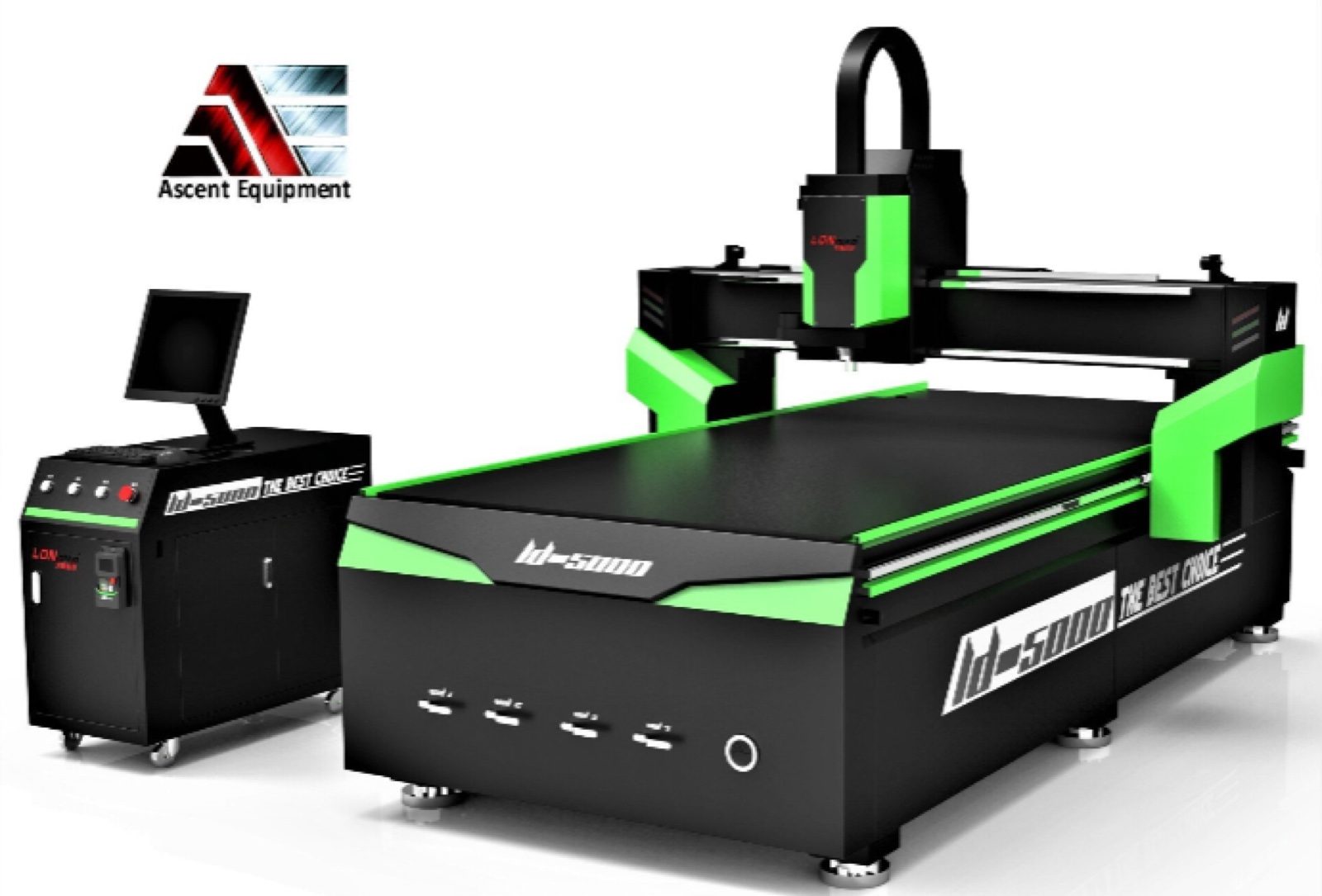
LD 5800CCD CNC router machine with CCD camera 1920w

How to Choose the Best CNC Router Tables & Machines

By Dov Rom • June 25, 2024

CNC routers are pivotal in modern manufacturing, providing precision and efficiency in creating complex designs. This blog aims to guide readers in selecting the best CNC router tables and machines for their needs. Understanding CNC Routers A CNC router is a computer-controlled cutting machine for wood, composites, aluminum, and plastics. It is integral in industries like woodworking, metalworking, and plastics fabrication. CNC router machines offer high accuracy, repeatability, and the ability to produce intricate designs, enhancing productivity and reducing human error. By understanding the applications and advantages of CNC routers, businesses can make informed decisions and ensure they invest in equipment that meets their specific requirements. Key Factors to Consider When choosing a CNC router, consider material compatibility first. Identify the materials you plan to work with, such as wood, metal, or plastic. Some CNC router machines specialize in specific materials, so ensure your choice aligns with your projects. Size and workspace are also critical. Look at the table size and overall machine dimensions to ensure they fit your available work area. Larger projects require more extensive tables; more extensive ones also need more space. Assess your workspace requirements to avoid any constraints. Precision and accuracy are vital, especially for detailed projects. High precision ensures clean cuts and smooth finishes. Check the machine's tolerance levels to see if they meet your standards. The lower the tolerance, the higher the accuracy. Software compatibility is another critical factor. The CNC router's software must be user-friendly and compatible with your operating system. Look for machines with robust software support and easy integration with design programs. User-friendliness ensures smoother operation and reduces the learning curve, allowing you to get started quickly. The price range for different types of CNC routers When selecting a CNC router, price range is a crucial factor. Entry-level CNC routers can cost a few thousand dollars, while industrial-grade models can cost tens of thousands. It's essential to balance cost with value. Investing in a higher-quality machine may have a higher upfront cost but can save money in the long run due to durability, fewer repairs, and better performance. Consider the additional features that can enhance your CNC router experience. Look for features like dust collection systems, automatic tool changers, and advanced safety features. These can improve efficiency and safety, making your work environment cleaner and more productive. Ascent Equipment offers a range of CNC routers that combine quality with value. Their machines are designed to meet various needs, from small businesses to large industrial applications. They offer excellent support and user-friendly software, ensuring you get the most out of your investment. With Ascent Equipment, you can find a CNC router that fits your budget without compromising quality. Considering these factors will help you choose the best CNC router, balancing cost, features, and long-term value to enhance productivity and project quality.

CNC router automation workflow in sign manufacturing

Experience The Benefits of The Ascent Profiles System

February 23, 2024

Experience The Benefits of The Ascent Profiles System

ASCENT 4AS

Choosing the Right Automatic Channel Letter Bending Machine for Your Signage Business

December 28, 2023

Choosing the Right Automatic Channel Letter Bending Machine for Your Signage Business. Its not hard. See how we can help you—locations in New York and Toronto.

channel letter 3D printing

Why you should purchase Ascent special type filament for channel letter 3D printing

May 12, 2022

Learn more about Differences between the standard filament and special channel letter filament with Ascent Equipment!

Channel Letter Bending Machines

Automation in the Sign Industry (from the perspective of an automation engineer)

September 7, 2021

Ascent Equipment entered the sign industry ten years ago with a focus on channel letter manufacturing. We develop CNC channel letter bending machines and etc.

Let Ascent Experts Assemble All the Pieces of The Equipment Puzzle for your Company

CONTACT US

CNC machines for the sign industry | Acrylic CO2, Laser Cutting Machine, Machines, USA and Canada

Let's talk!

Have a question or comment?

Let us know.

Contact info

Direct line:
416-953-8104

Toll-free:
1-800-927-5107 Extension 1008

Tel:
647-494-7800 Extension 1008

Para personas que hablan español, por favor llame a la extensión 1006.

Buffalo, New York and Toronto, Ontario

Follow us


channel letter former

← All articles
More from Ascent

Related articles

How to Set Up a Laser Welding Workstation: Table, Fixturing, Ventilation, and Safety Zone
A practical setup guide for handheld fiber laser welding stations — table height, fixturing essentials, fume extraction placement, safety zone layout, cable management, and what to have within arm's reach before the first arc.
How to Train a Channel Letter Fabricator: Who to Hire, What to Train, and How Long It Takes
Labor is the #1 cost in channel letter production. A practical guide to hiring the right person, what skills to expect on day one versus what to build, and realistic timelines for reaching production speed on each machine in the channel letter workflow.
Laser Welder Fit-Up and Gap Control: Why Gaps Are a Safety Problem, Not Just a Quality Problem
A gap between two parts being laser welded is not just a weld defect waiting to happen — it is a beam transmission hazard. Here is how to achieve proper fit-up, fixture parts correctly, and protect against the gaps that still slip through.
Materials That Block a 1070nm Fiber Laser Beam: What Works, What Doesn't, and Why
Not every material stops a fiber laser beam. This reference guide covers which flexible and rigid materials absorb or reflect 1070nm energy, how to use them in a welding setup, and what the commercial laser safety products are actually made of.
Laser Welder vs. MIG and TIG: How to Convince an Experienced Welder (and Address the Safety Concerns)
An experienced MIG or TIG welder's skepticism about switching to laser is rational. Here is how to address it honestly — the performance comparison across aluminum gauges, the real safety risks, and how to close the conversation.
How to Make a Channel Letter — The Ascent Way with TMB3
A step-by-step walkthrough of building a channel letter using the Ascent CNC Router, TMB3 bending and trim machine, and Ascent Stapler — including how the TMB3 converts flat aluminum coil into trim cap automatically, saving 20–50% on material cost.
How to Make a Channel Letter — The Ascent Way with EDGE3
A complete step-by-step walkthrough of building a channel letter from design to delivery using the Ascent CNC Router, EDGE-3 bending machine, and Ascent Stapler — faster, more accurate, and more profitable than hand methods.
Making Aluminum Trim with the TMB3 — Better Than Plastic, Cheaper Per Foot, and Glues the Same Way
How the Ascent TMB3 converts flat aluminum coil into finished trim cap on demand — why aluminum outlasts plastic, how the PVC-coated coil lets you use standard contact cement, and what the cost savings look like in practice.
Buying Ascent Equipment: Purchase Outright, Finance, and Use IRS Section 179
For most sign companies, the decision isn't whether to buy equipment — it's how to pay for it. A practical guide to purchasing outright vs. financing, cash flow comparisons, and how IRS Section 179 can reduce your tax burden whether you pay cash or finance.
What Sign Manufacturers Are Buying in 2026 — and Why Ascent Has the Answer
The sign industry's equipment buying decisions in 2026 are driven by labor shortages and profitability — not equipment age. Here's who is actively buying, what problem they're solving, and why Ascent Equipment is positioned to solve all of it from one source.
Laser Cutter Consumables: What to Stock for Your CO₂ and Fiber System
A practical guide to consumables, replacement schedules, and spare parts for shops running a dual-gantry CO₂ and fiber laser cutter — so downtime never catches you off guard.
Laser Safety for Industrial Laser Cutters: What U.S. Operators Need to Know
A practical guide to OSHA, FDA, and ANSI laser safety requirements for shops running industrial CO₂ and fiber laser cutting systems — covering engineering controls, PPE, ventilation, and daily checklists.
Safety Considerations for the Ascent QCW Laser Welder
A complete safety guide for the Ascent QCW fiber laser welder — covering Class 4 laser requirements, eye protection, PPE, controlled areas, fume extraction, and daily inspection procedures.
How to Price Channel Letters in 2026 When Using Ascent Equipment
A practical pricing guide for channel letter fabricators — the inch rule, cost-plus method, how each Ascent machine (5AS, EDGE-3, TMB3, laser welder, laser cutter) changes your cost structure, and worked examples comparing five shop configurations.
Ascent 2000W Refrigeration Laser Welder vs. the Competition
A feature-by-feature comparison of the Ascent Equipment 2000W Refrigeration Handheld Fiber Laser Welder against leading competitors — cooling technology, duty cycle, operating costs, and what matters most for production shops.

Let Ascent Experts Assemble All the Pieces of The Equipment Puzzle for your Company

Contact us